Killer Pool 3DKiller Pool 3D
Yardım merkezi

Killer Pool 3D nasıl oynanır?

Kurallar, kontroller, mağaza, arkadaşlar ve hesabın hakkında ekran görüntülü, adım adım rehber.

Son güncelleme: 29 Ekim 2026

Bu sayfadaBaşlarkenAna ekranKiller kurallarıAtış ve kontrollerOyun modlarıCoin, elmas ve ödüllerMağaza ve etkinlikArkadaşlar, sohbet ve güvenlikAyarlar ve sesHesabını yönetmeSorun giderme

Başlarken

Killer Pool 3D, “son kalan kazanır” mantığıyla oynanan çevrim içi 3D bilardo oyunudur. iPhone, iPad, Android ve tarayıcıda oynanır; hesabın her yerde aynıdır. Bu rehber oyunu ilk açışından masada kazanmaya, mağazadan hesabını yönetmeye kadar her şeyi gerçek ekran görüntüleriyle anlatır.

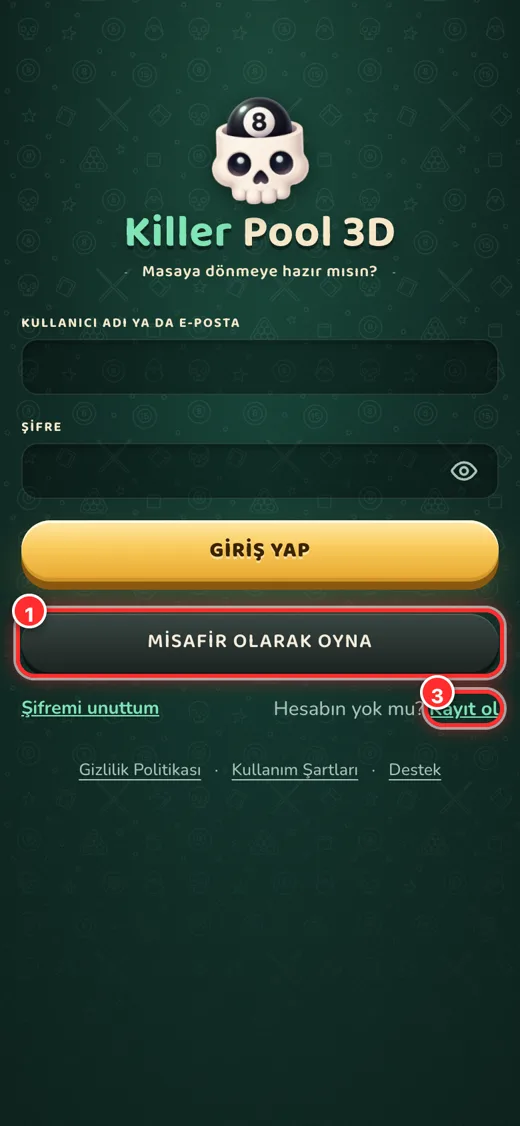
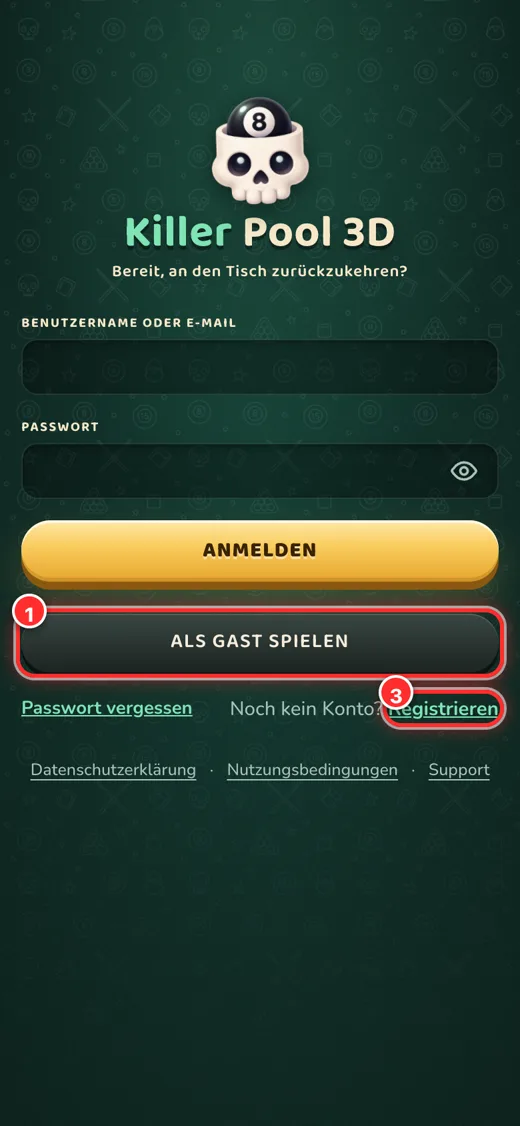
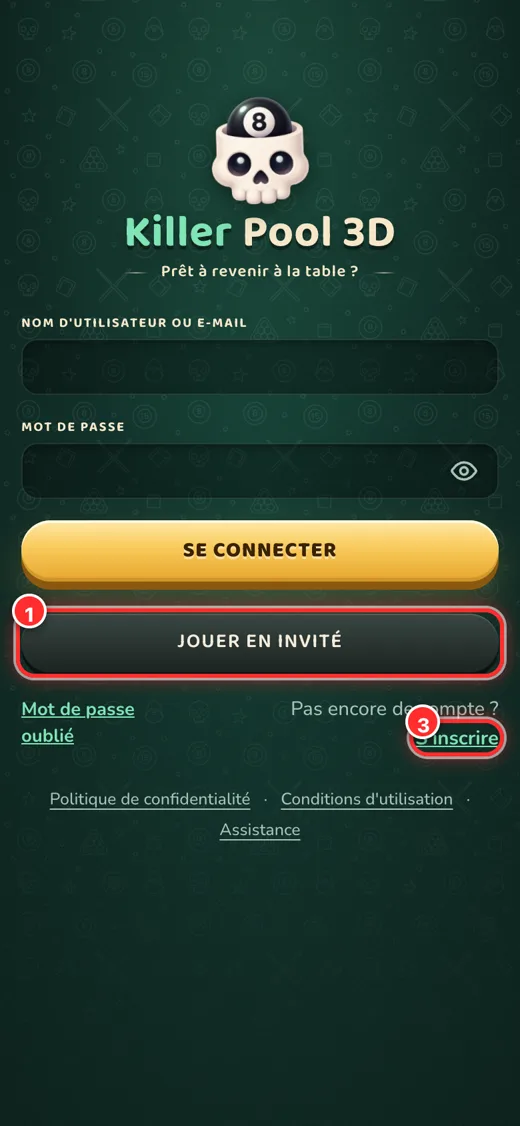
Giriş ekranı: numaralar aşağıdaki listeyle eşleşir.

Nasıl giriş yaparım?

  1. Misafir olarak oyna: kayıt olmadan hemen oyna. İlerleme yalnız bu cihazda tutulur; sonra “Kaydet” ile kalıcı hesaba çevirebilirsin.
  2. Google: Google hesabınla tek dokunuşla giriş (iOS’ta ayrıca Apple ile giriş de bulunur).
  3. Kayıt ol: kullanıcı adı, şifre ve e-posta ile hesap aç. Adresine bir doğrulama bağlantısı gelir; tıklayınca hesabın açılır.
ℹ️
Giriş alanına kullanıcı adını ya da e-posta adresini yazabilirsin. Şifreni unuttuysan “Şifremi unuttum”a dokun.

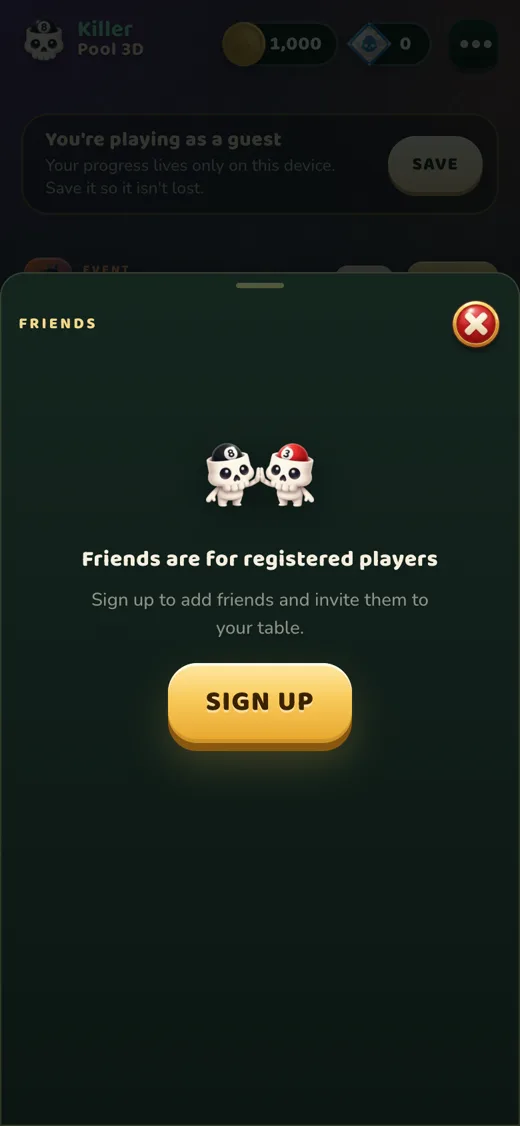
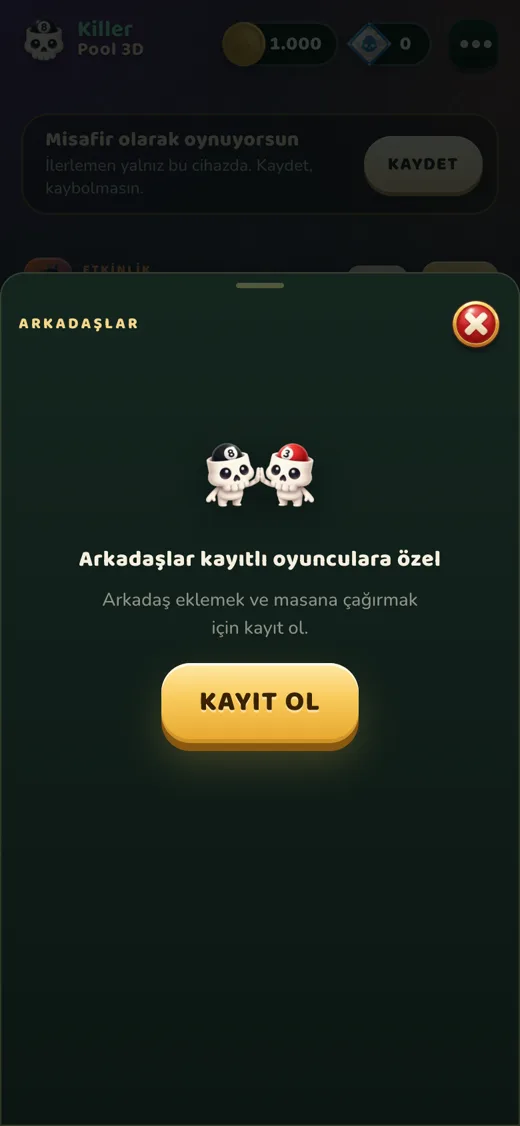
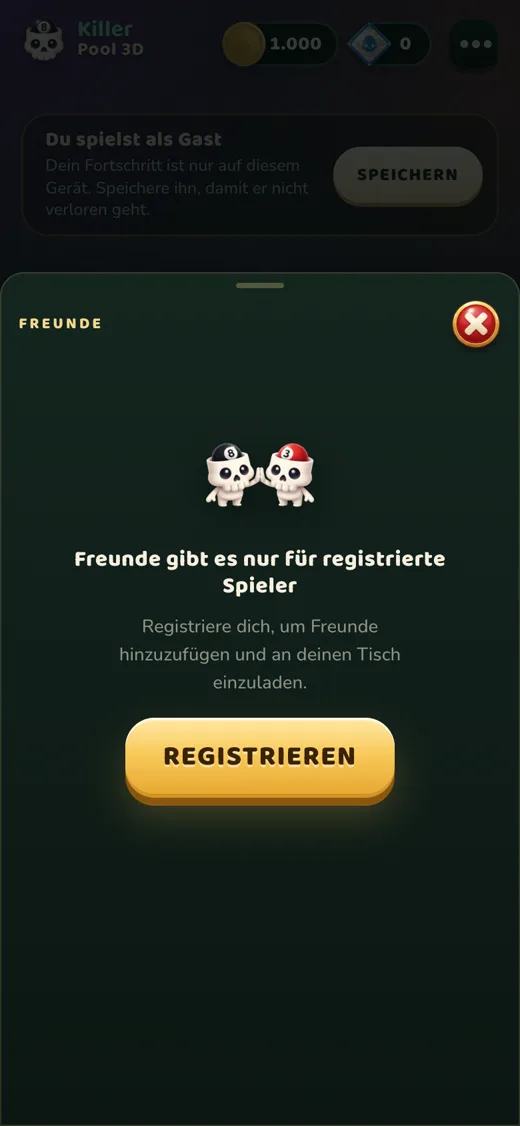
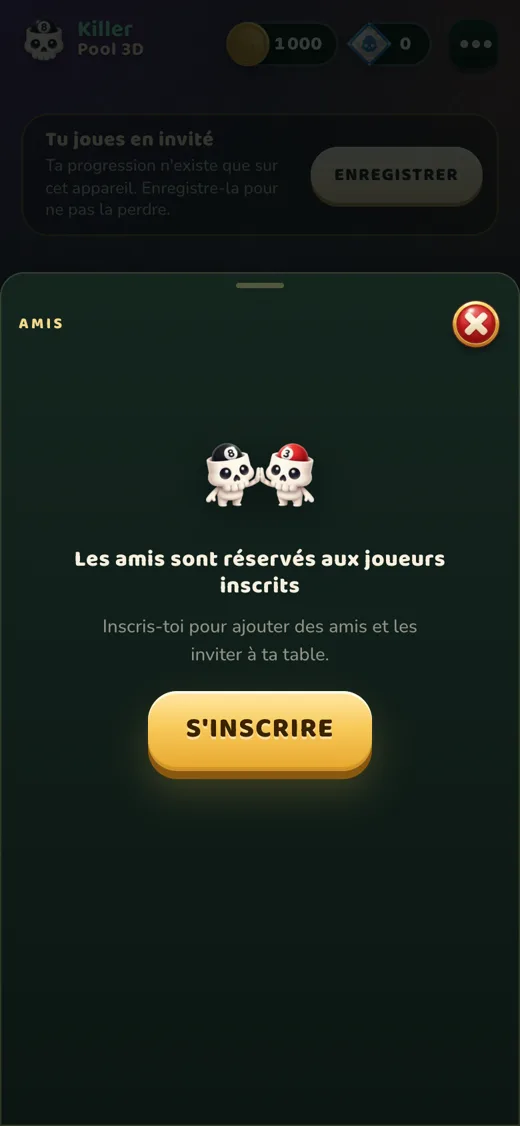
Misafir hesaplarda arkadaş listesi, günlük ödül, etkinlik ödülleri ve satın alma kapalıdır; kayıt olduğunda hepsi açılır ve ilerlemen korunur.

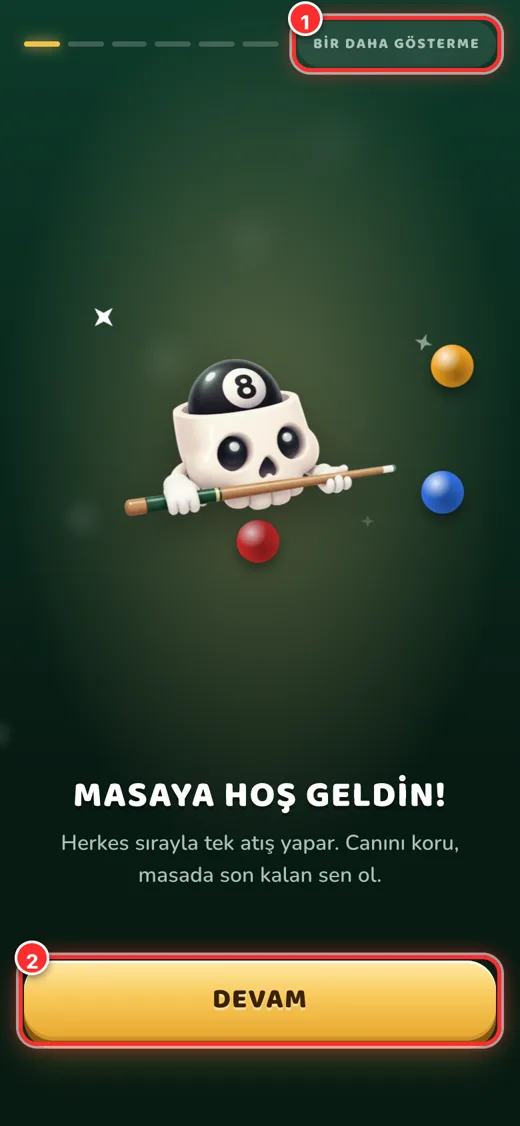
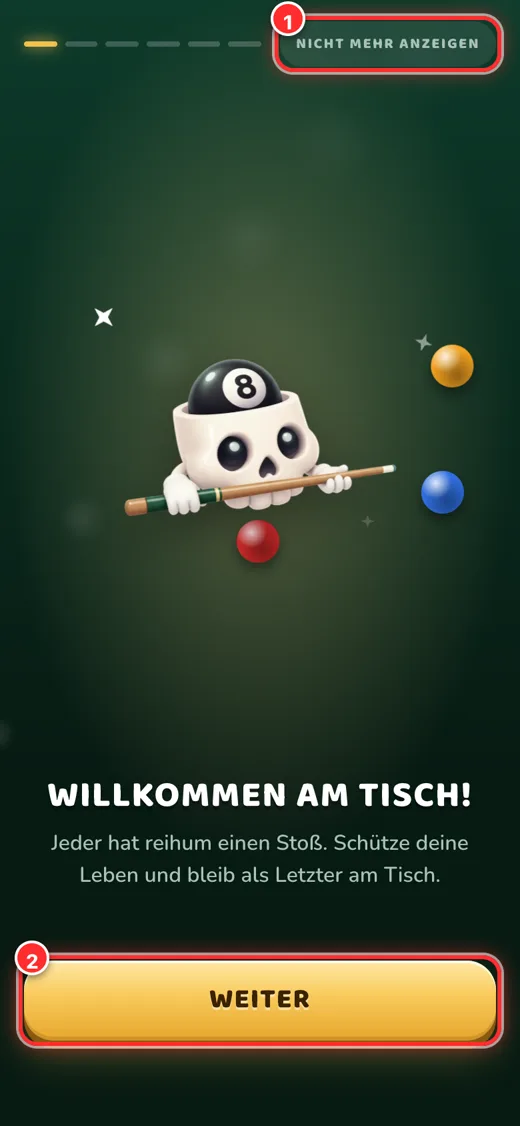
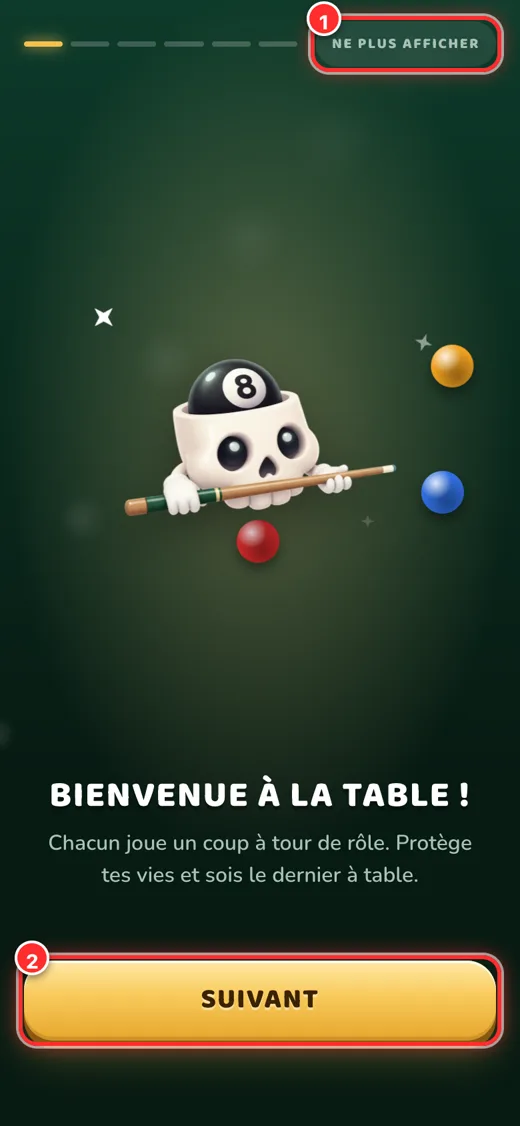
İlk açılışta çıkan 6 sayfalık tanıtım.

Tanıtım turu

İlk girişte kurallar ve kontroller 6 kısa sayfada anlatılır. İstersen “Bir daha gösterme” ile geçebilir, sonra Menü → Ayarlar’dan yeniden izleyebilirsin.

Ana ekran

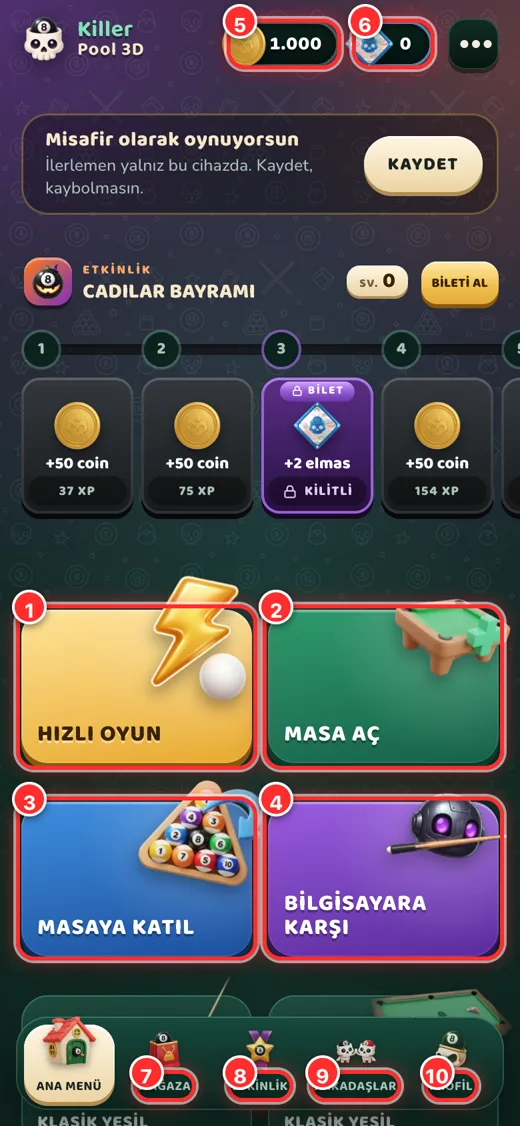
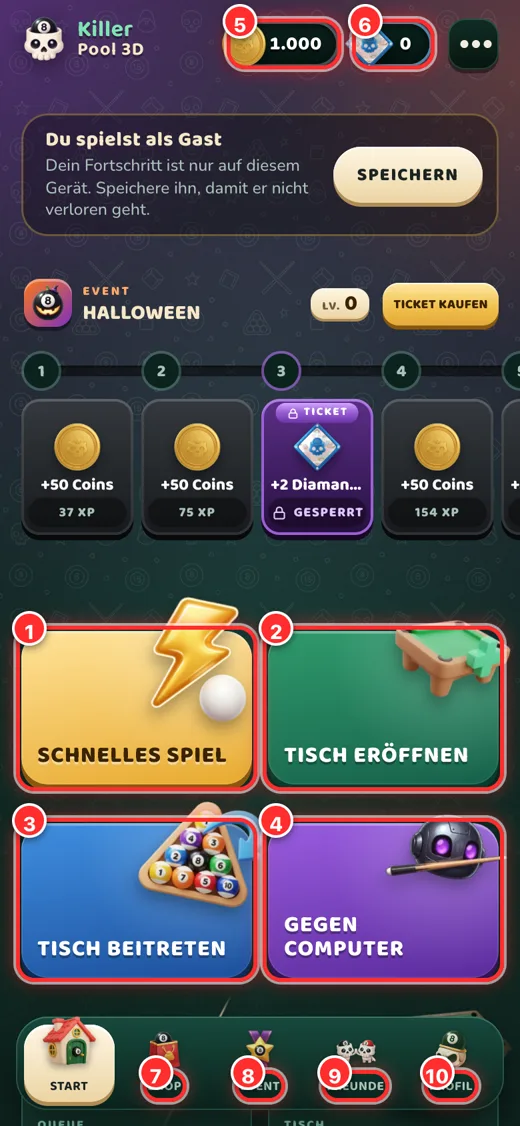
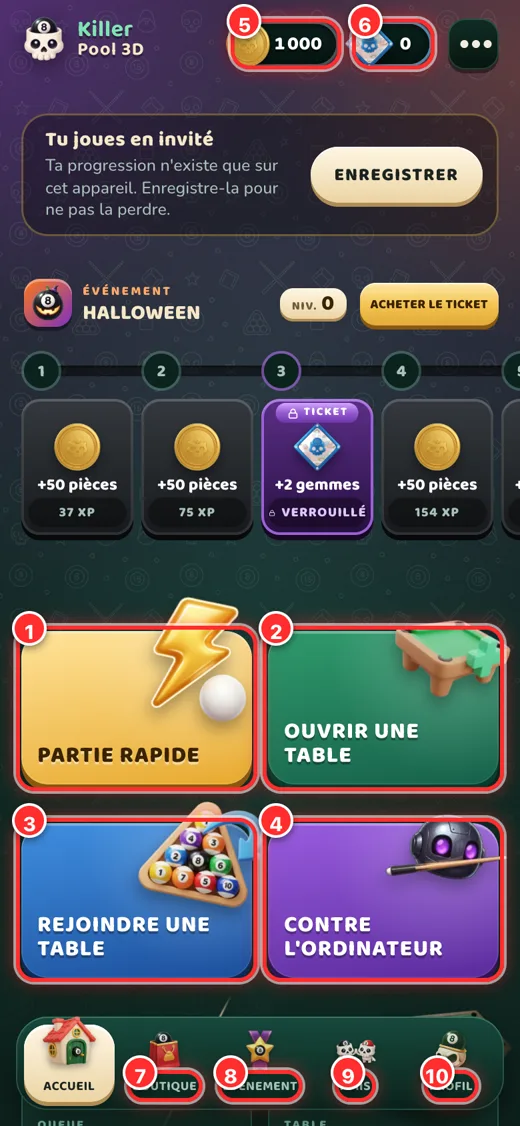
Ana ekran (lobi).
Ana ekran (lobi).
  1. Hızlı oyun: saniyeler içinde uygun bir masaya oturtulursun.
  2. Masa aç: kendi masanı kur; can, giriş ve şifreyi sen seçersin, arkadaşlarını kodla çağırırsın.
  3. Masaya katıl: bir arkadaşının verdiği kodla masaya gir.
  4. Bilgisayara karşı: bota karşı antrenman; para ve rakip beklemeden öğren.
  5. Coin bakiyen: oynayarak kazandığın oyun içi para. Dokununca nasıl kazanılacağı görünür.
  6. Elmas bakiyen: mağazadan alınan premium oyun parası; mağazayı açar.
  7. Mağaza · 8 Etkinlik · 9 Arkadaşlar · 10 Profil: alt menü.

Killer kuralları

Herkes sırayla tek atış yapar. Her oyuncunun birkaç canı vardır; masada son kalan oyuncu kazanır.

  • 🎯 Top sok, canını koruKırmızı bir top sokarsan canın yerinde kalır. Hiç top sokamazsan bir can gider.
  • 🎱 Siyah 8 = +1 canSiyah 8’i sokarsan bir can kazanırsın.
  • 🪙 Coin kulesine değme!Masanın ortasındaki coin kulesine değen oyuncu bütün canlarını kaybedip masadan kalkar. Açılış vuruşunda kule masada olmaz.
  • ⚪ Beyaz top faulüBeyaz topu cebe düşürmek ya da hiçbir topa değdirmemek faul sayılır: bir can gider ve sıradaki oyuncu beyazı istediği yere koyar.
  • 🏆 KazananCanı bitenler masadan kalkar; son kalan oyuncu masanın ödülünü alır.

Atış ve kontroller

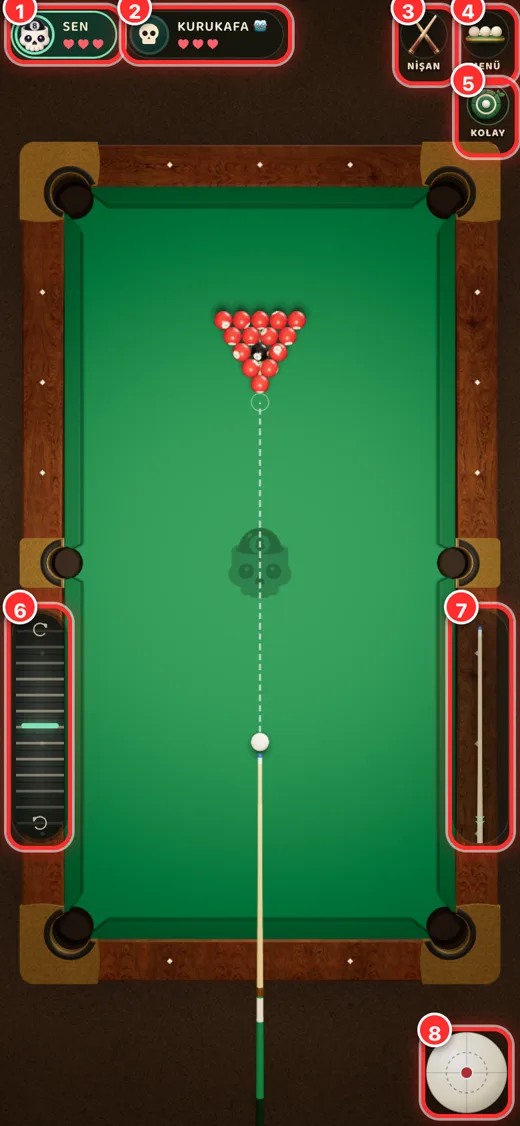
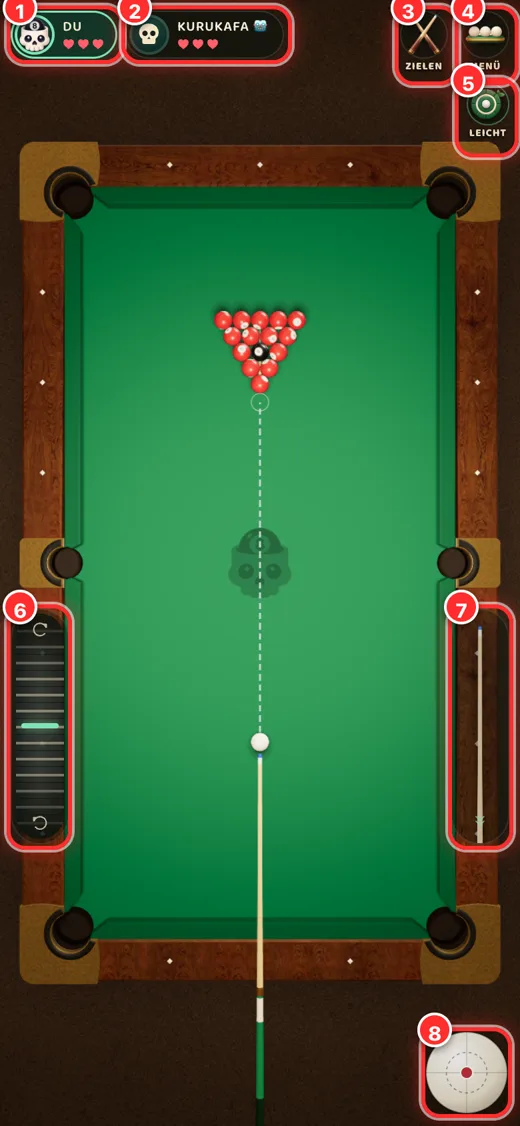
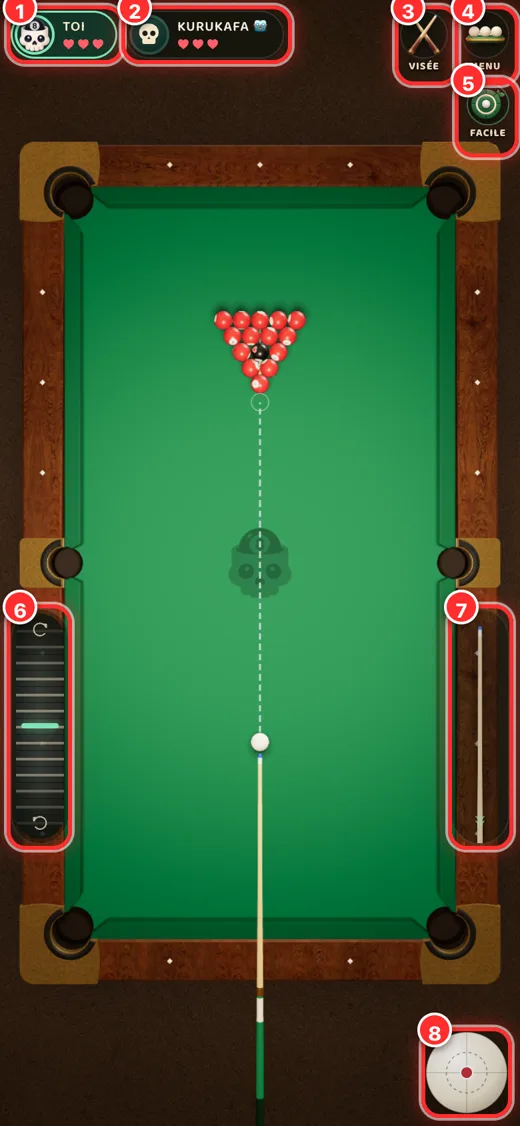
Bilgisayara karşı antrenman ekranı.

Aşağıdaki numaralar ekran görüntüsüyle eşleşir.

  1. Senin kartın: kalan canların (kalpler) ve sıra göstergesi.
  2. Rakip kartı: rakibin ve canları.
  3. Nişan / Açı düğmesi: nişan (FPS) görünümü ile tepeden görünüm arasında geçiş.
  4. Menü: masadan çık, ayarlar.
  5. Zorluk: antrenmanda Kolay (nişan çizgisi açık) ya da Zor (nişan çizgisi yok, bot isabetli).
  6. Sol şerit: ince nişan ayarı; yavaş kaydır = ince, hızlı kaydır = büyük dönüş.
  7. Güç şeridi: ıstakayı çekip bırakarak atışın gücünü ver.
  8. Falso topu: beyaz topun neresine vuracağını seç (üst, alt, yan).

Telefonda

  1. Masada parmağınla sürükleyerek ya da bir topa dokunarak nişan al. Yavaş sürükleme ince ayar yapar.
  2. Sağdaki ıstakayı aşağı çek, istediğin güce gelince bırak.
  3. İstersen sağ alttaki beyaz topla falso ver.

Bilgisayarda

Fareyle nişan al; tıkla, geri çek, bırak. Tepeden görünüm için 2, nişan görünümü için 3 tuşunu kullan; tekerlek nişanda yaklaştırır.

Oyun modları

ModNe işe yarar?
Hızlı oyunSeçtiğin mod, can sayısı ve giriş ücretine uygun bekleyen bir masaya oturtur; uygun masa yoksa yeni bir masa açılır ve rakipler geldikçe yerlerini alır. Masa dolunca maç kendiliğinden başlar.
Masa açMasayı kuran kişi (kurucu) maçı istediği an “Oyunu başlat” ile başlatır; masa dolarsa kendiliğinden açılır. Arkadaşlarını kod ya da bağlantıyla çağırırsın.
Masaya katılBir arkadaşının paylaştığı kodla masaya girersin.
Bilgisayara karşıBota karşı antrenman. Coin ya da rakip gerekmez.

Giriş ücreti maç başlarken herkesten alınır ve toplanan ödülün tamamı kazananın olur. Bağlantın koparsa masadaki yerin sıran gelene kadar durur; geri dönüp “Oyuna devam et” diyebilirsin.

Coin, elmas ve ödüller

🪙

Coin

Yalnızca oynayarak kazanılır: günlük hediye, maç ödülleri ve etkinlik basamakları. Masa giriş ve ödülünde kullanılır. Satılmaz, elmasla alınamaz.

💎

Elmas

Mağazadan satın alınan premium oyun parasıdır. Kaplamalar (ıstaka, masa, top) ve emote’lar ile etkinlik bileti için kullanılır. Coin’e dönüşmez.

  • Günlük hediye: belirli aralıkla bir kez alınır (kayıtlı hesaplarda).
  • Maç ödülü: maç sonunda kazanana ve katılanlara coin verilir.

Mağaza ve etkinlik

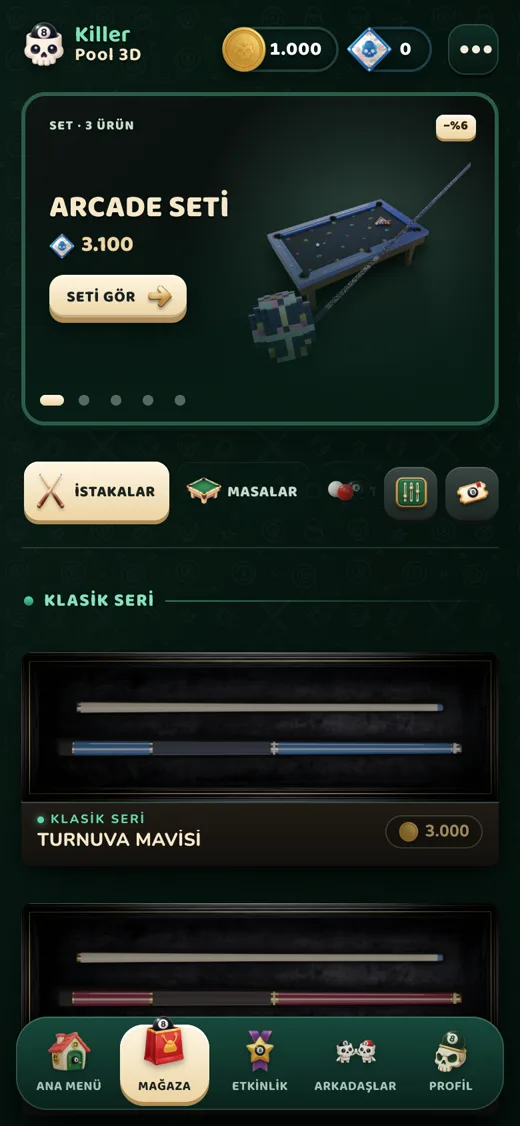
Mağaza
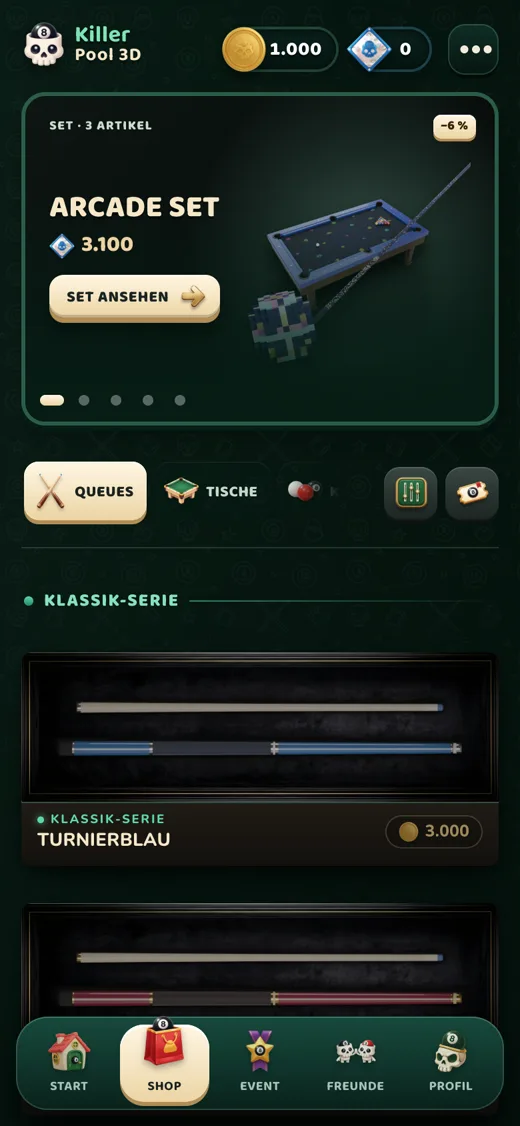
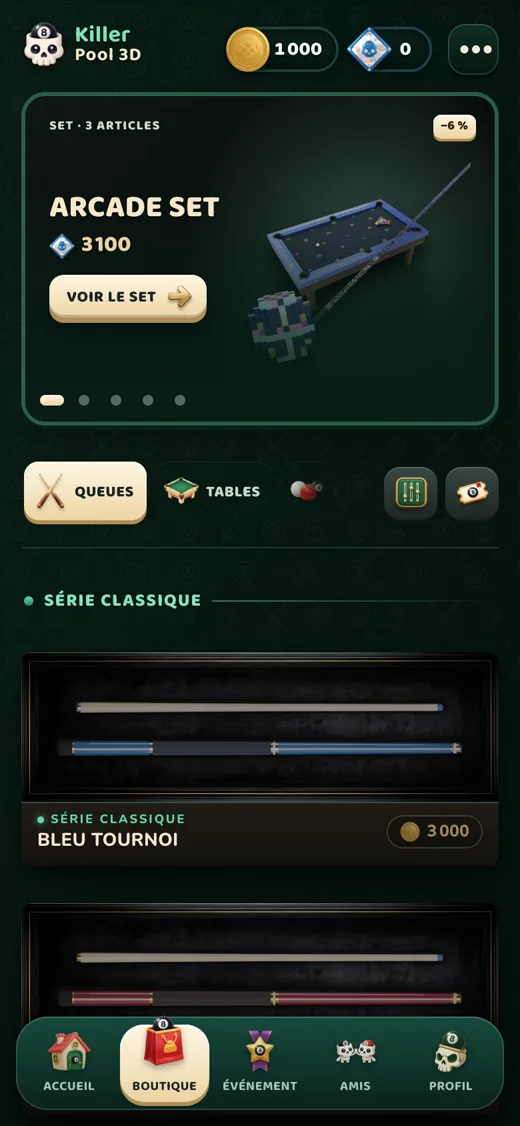
Mağaza
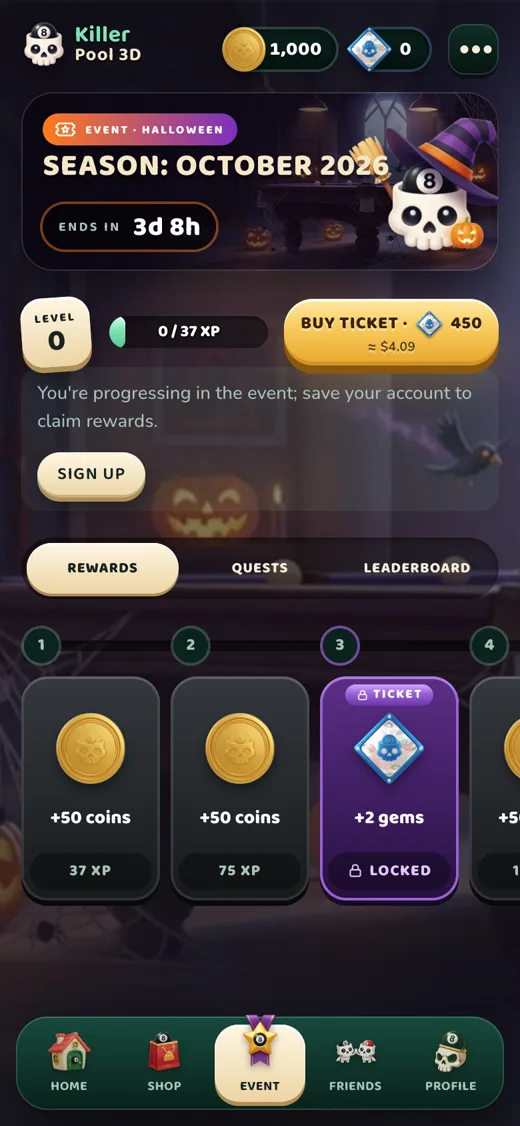
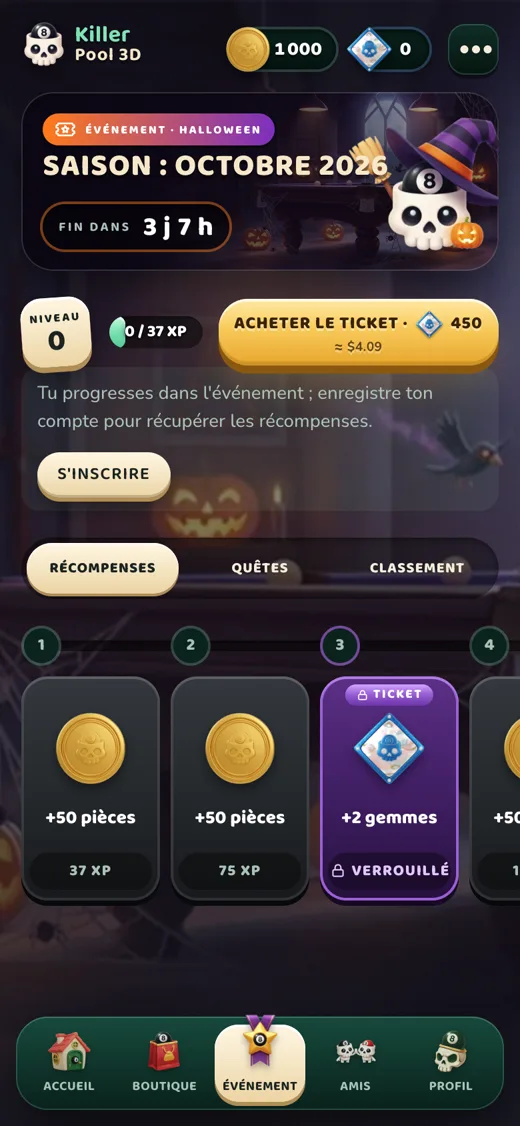
Aylık etkinlik
Aylık etkinlik
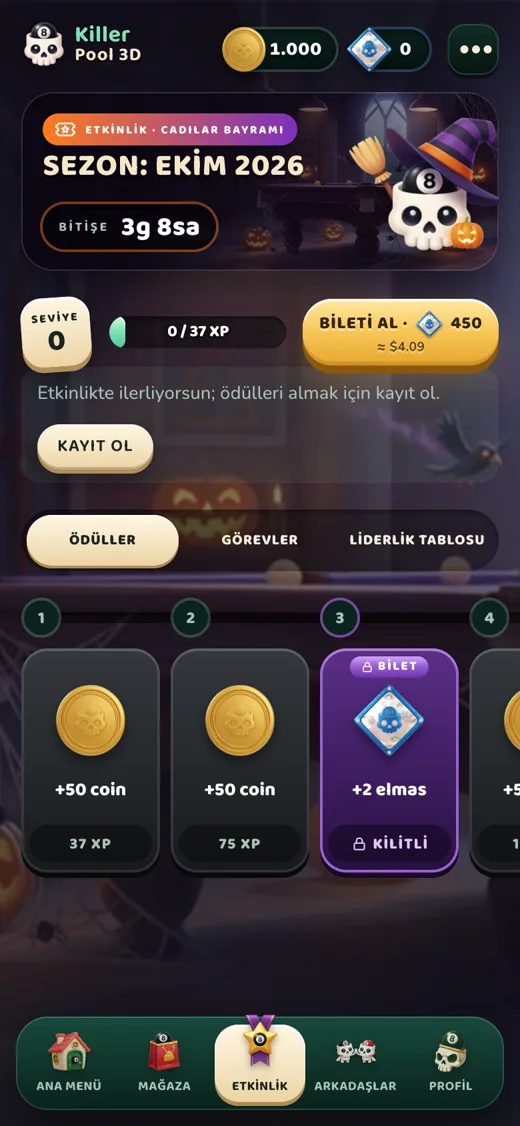
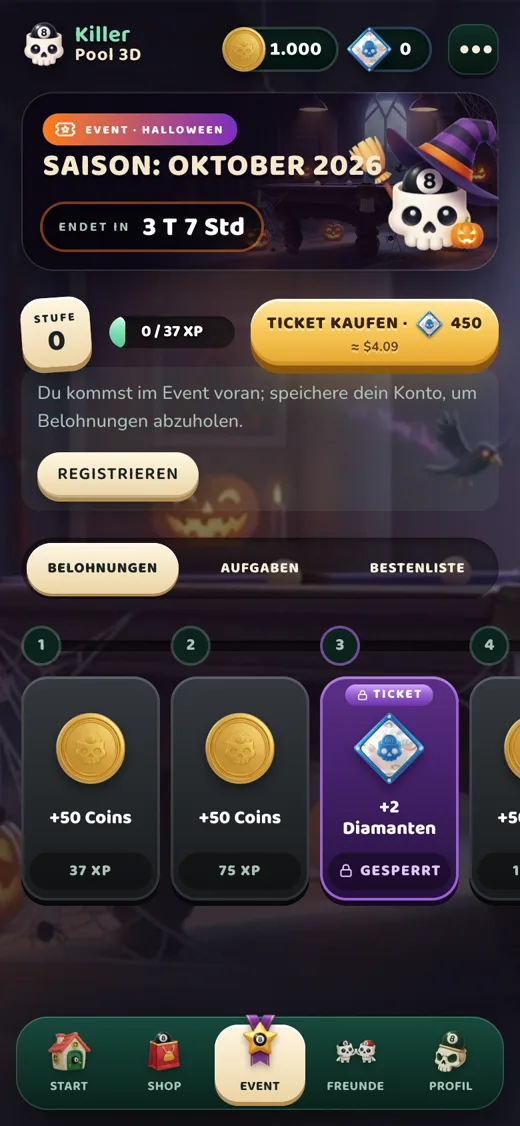
  • Mağaza: ıstaka, masa, top kaplamaları ve emote’lar; elmas paketleri. Kaplamalar yalnız görünüştür, oyun gücünü değiştirmez.
  • Etkinlik: her ay yeni bir tema, 60 basamak. XP kazandıkça basamaklar açılır; ücretsiz yolda coin ve küçük elmaslar, bilete özel yolda özel kaplamalar vardır. Bilet elmasla alınır ve ödüller etkinliğe özeldir.
  • Satın alınan her şey hesabına bağlıdır ve cihaz değiştirsen de kalır.
ℹ️
Fiyatlar bulunduğun ülkeye göre mağazadan (App Store, Google Play) ya da ödeme sayfasından gösterilir. İade ve ödeme sorunları için Destek sayfasına bak.

Arkadaşlar, sohbet ve güvenlik

Arkadaşlar sekmesi.
Arkadaşlar sekmesi.
  • Arkadaş ekle: kullanıcı adıyla istek gönder; kabul edilince arkadaş olursunuz. Davetleri masadan da gönderebilirsin.
  • Sohbet: yalnızca karşılıklı arkadaşlarla ve yalnızca ana ekranda; maç sırasında yoktur. Rastgele kişilerle sohbet edilemez.
  • Süzgeç: küfür, bağlantı, e-posta, telefon ve @kullanıcı adı içeren mesajlar gönderilmez. Mesajlar 30 gün sonra silinir.
  • Şikâyet et / Engelle: bir oyuncunun ya da mesajın şikâyetini oyuncu kartından veya sohbet menüsünden yapabilirsin. Engellediğin oyuncu sana istek, davet ve mesaj gönderemez; bildirim gitmez. Engelini arkadaş panelinde “Engellenenler” altından kaldırabilirsin.
⚠️
Kişisel bilgilerini (telefon, adres, şifre) hiç kimseyle paylaşma. Rahatsız edici bir durumda şikâyet et ya da contact@killerpool3d.com adresine yaz.

Ayarlar ve ses

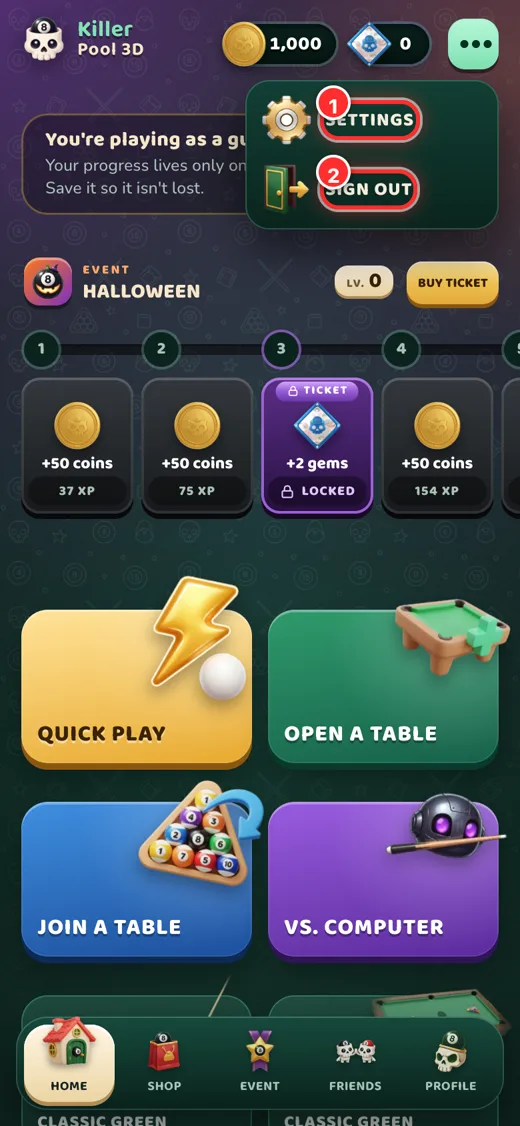
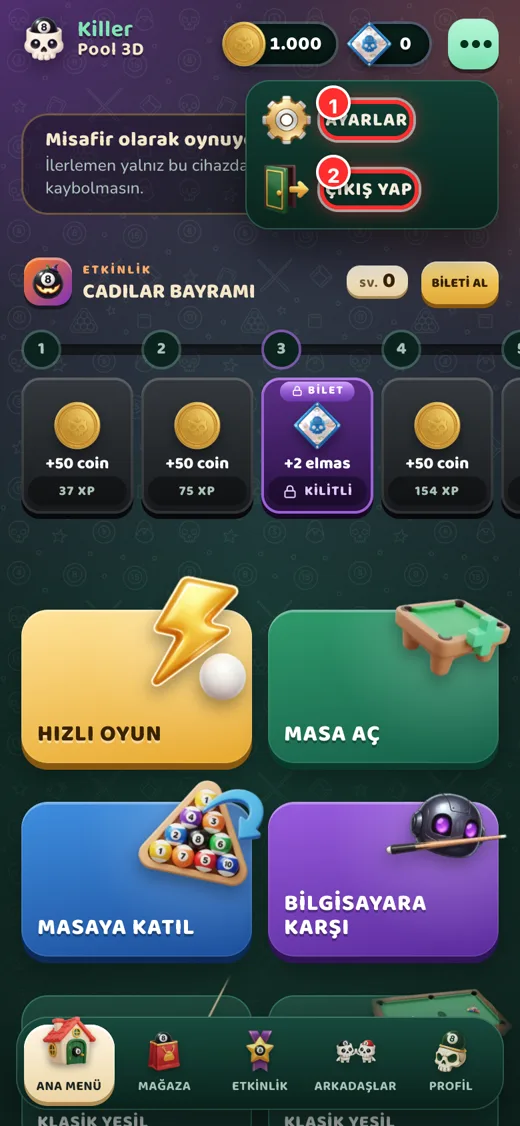
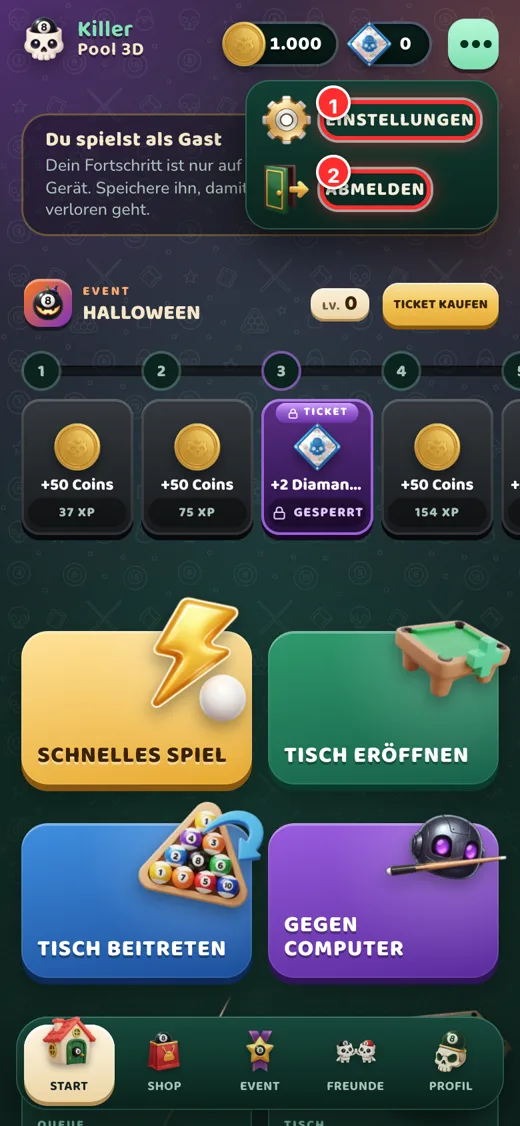
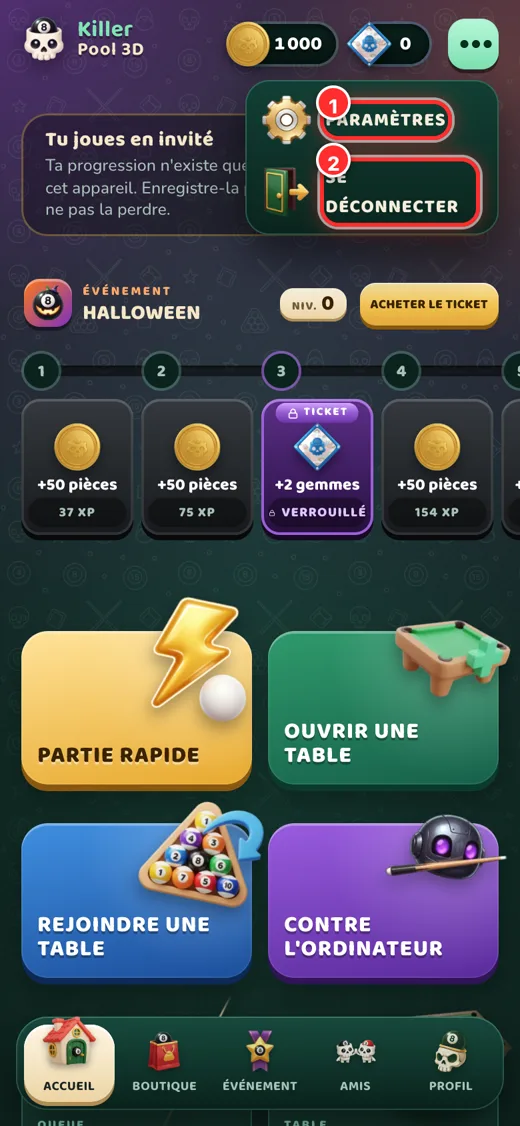
Menü: ayarlar ve çıkış.

Üstteki ⋯ Menü düğmesi Ayarlar ve Çıkış yap’ı açar. Ayarlarda şunları bulursun:

  • Efekt sesi, müzik ve ana ses seviyesi
  • Süre uyarısı (sıranın son 5 saniyesinde)
  • Etkinlik süsleri ve grafik kalitesi
  • Dil: Türkçe, English, Deutsch, Français
  • Tanıtımı yeniden izle
  1. Ayarlar
  2. Çıkış yap

Hesabını yönetme

  • Şifre sıfırlama: giriş ekranında “Şifremi unuttum”; doğrulanmış e-postana bağlantı gelir.
  • Kullanıcı adı: Profil’den belirli aralıkla değiştirilebilir. Uygunsuz adlar reddedilir.
  • Misafirden kalıcı hesaba: ana ekrandaki Kaydet ile; coin ve kaplamaların korunur.
  • Hesabı silme: adım adım ekran görüntülü anlatım için Hesap silme sayfasına bak.

Sorun giderme

Giriş yapamıyorum

Kullanıcı adı/e-posta ve şifreni kontrol et. E-posta doğrulanmadıysa gelen kutundaki (ve gereksiz klasöründeki) bağlantıya tıkla; giriş denersen yeni bağlantı gönderilir.

Google ile giriş çalışmıyor

Cihazında doğru Google hesabının seçili olduğundan emin ol. Sorun sürerse e-postayla giriş dene ya da bize hata mesajının ekran görüntüsüyle yaz.

Elmasım yüklenmedi

Birkaç dakika bekle ve uygulamayı kapatıp aç. Yüklenmediyse sipariş saatini ve kullanıcı adını contact@killerpool3d.com adresine yaz; satın alma kaydını inceleriz.

Oyun yavaş ya da takılıyor

Ayarlar’dan grafik kalitesini düşür, arka planda çalışan uygulamaları kapat. Wi-Fi veya iyi bir mobil bağlantı kullan; oyun çevrim içi senkron çalışır.

Bağlantım koptu, masadan atıldım mı?

Hayır. Masadaki yerin sıran gelene kadar durur. Hemen geri dönüp “Oyuna devam et”e dokun.

Desteklenen cihazlar

iPhone/iPad (güncel iOS), Android 7.0 ve üzeri, ve modern tarayıcılar (Chrome, Safari, Edge, Firefox). 3D için WebGL gerekir.

Aradığını bulamadıysan Destek sayfasından bize ulaş.

Help center

How to play Killer Pool 3D

A step-by-step guide with screenshots to the rules, controls, shop, friends and your account.

Last updated: 29 October 2026

On this pageGetting startedHome screenKiller rulesShooting and controlsGame modesCoins, gems and rewardsShop and eventFriends, chat and safetySettings and soundManaging your accountTroubleshooting

Getting started

Killer Pool 3D is an online 3D pool game where the last player standing wins. It runs on iPhone, iPad, Android and in your browser, with the same account everywhere. This guide walks you through the game with real screenshots, from your first launch to winning a table and managing your account.
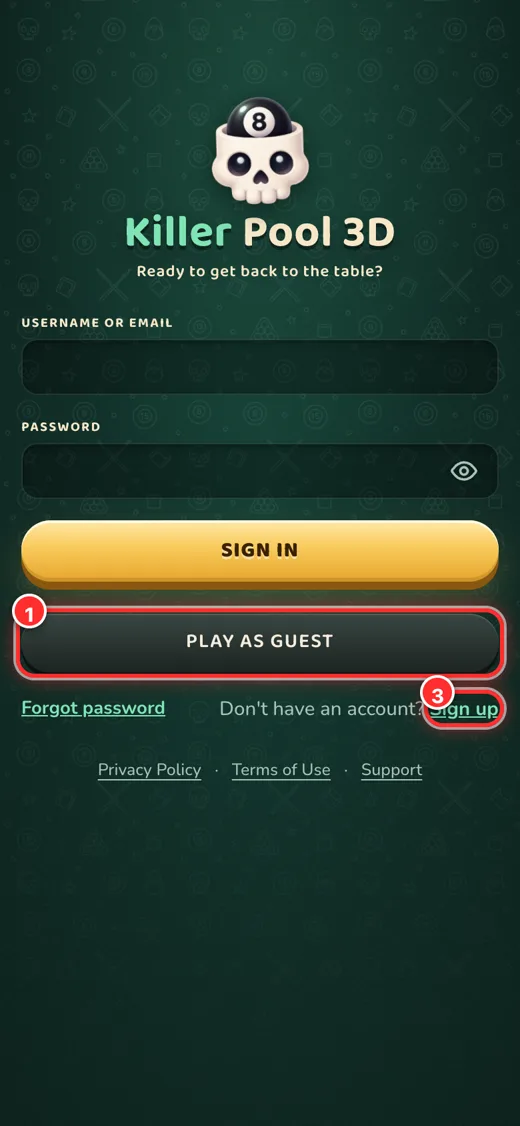
Sign-in screen: the numbers match the list.

How do I sign in?

  1. Play as guest: jump in without signing up. Progress is stored on this device only; you can turn it into a permanent account later with “Save”.
  2. Google: one-tap sign-in with your Google account (on iOS, Sign in with Apple is also available).
  3. Sign up: create an account with a username, password and email. We send a verification link; tap it to activate your account.
ℹ️
In the sign-in field you can type your username or your email address. Forgot your password? Tap “Forgot password”.

Guest accounts have no friend list, daily gift, event rewards or purchases; when you sign up they all unlock and your progress is kept.
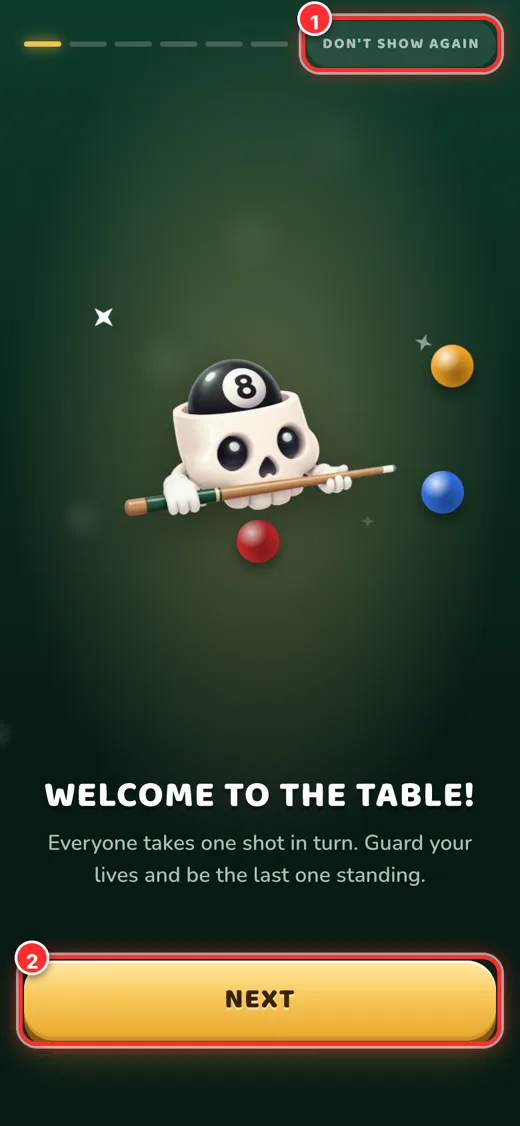
The 6-page tutorial shown on first launch.

Tutorial

The first time you sign in, the rules and controls are explained in 6 short pages. You can skip with “Don’t show again” and replay it later from Menu → Settings.

Home screen
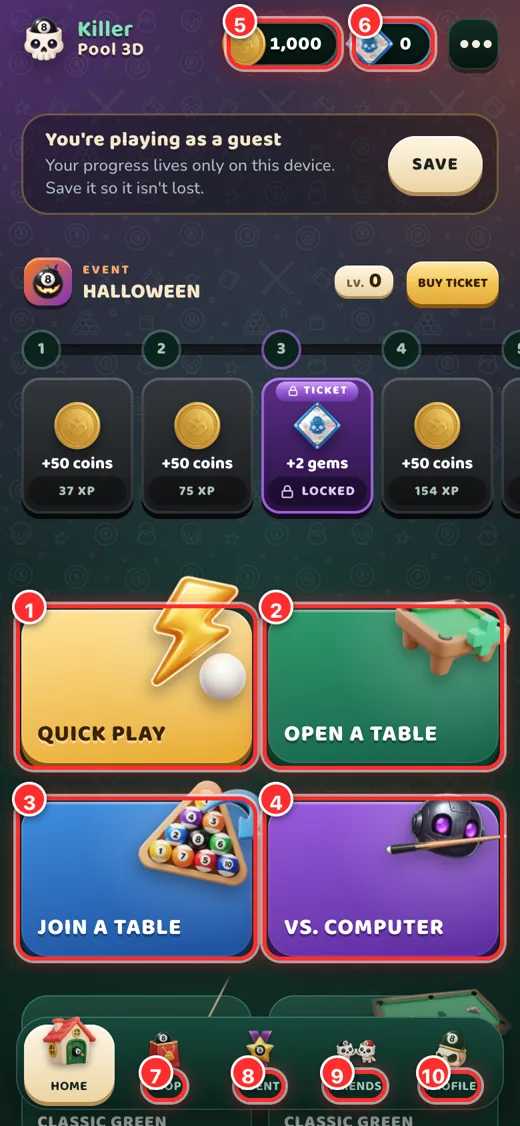
Home screen (lobby).
  1. Quick play: you are seated at a suitable table within seconds.
  2. Open a table: set up your own table; choose lives, entry and a password, and invite friends with a code.
  3. Join a table: enter a table with a code from a friend.
  4. Play the computer: practice against the bot; no coins or opponents needed.
  5. Coin balance: the in-game money you earn by playing. Tap to see how to earn more.
  6. Gem balance: premium currency bought in the shop; opens the shop.
  7. Shop · 8 Event · 9 Friends · 10 Profile: bottom menu.

Killer rules

Everyone takes one shot in turn. Each player has a few lives; the last player at the table wins.

  • 🎯 Pot a ball, keep your lifePot a red ball and your life stays. Pot nothing and you lose a life.
  • 🎱 Black 8 = +1 lifePot the black 8 to earn a bonus life.
  • 🪙 Don’t touch the coin tower!Touch the coin tower in the middle and you lose all your lives and leave the table. The tower is not on the table for the opening shot.
  • ⚪ White-ball foulPocketing the white or hitting no ball is a foul: you lose a life and the next player places the white anywhere.
  • 🏆 The winnerPlayers with no lives leave the table; the last player takes the table’s prize.

Shooting and controls
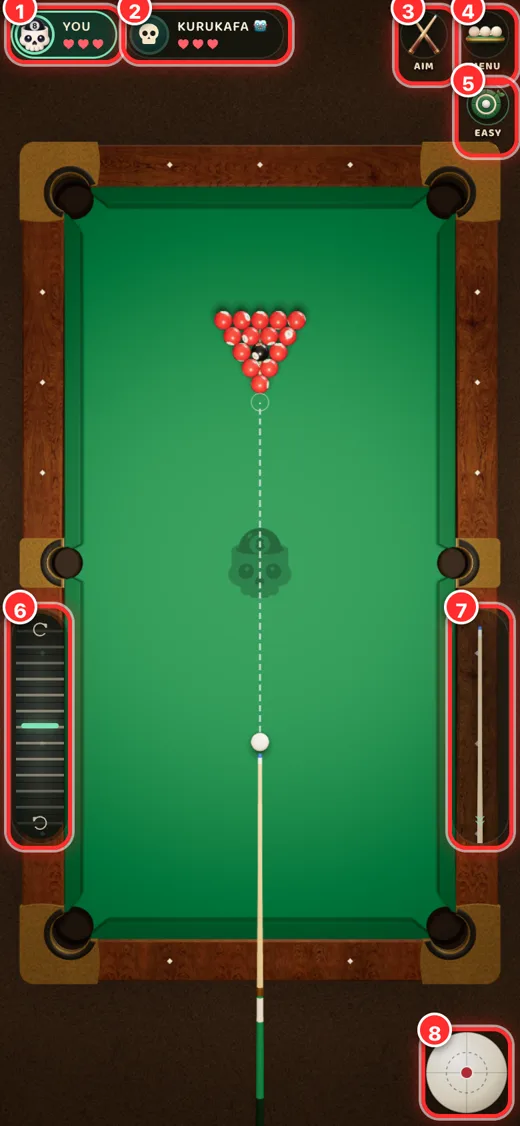
Practice against the computer.

The numbers match the screenshot.

  1. Your card: your remaining lives (hearts) and the turn indicator.
  2. Opponent card: your opponent and their lives.
  3. Aim / View button: switch between the aim (first-person) view and the top-down view.
  4. Menu: leave the table, settings.
  5. Difficulty: in practice, Easy (aim line on) or Hard (no aim line, accurate bot).
  6. Left strip: fine aim adjustment; slide slowly for fine turns, quickly for big turns.
  7. Power strip: pull the cue back and let go to set the shot power.
  8. Spin ball: choose where to hit the white ball (top, bottom, side).

On a phone

  1. Drag on the table or tap a ball to aim. Dragging slowly fine-tunes the angle.
  2. Pull the cue on the right downwards and release at the power you want.
  3. Optionally add spin with the white ball at the bottom right.

On a computer

Aim with the mouse; click, pull back, release. Press 2 for the top-down view and 3 for the aim view; the wheel zooms while aiming.

Game modes

ModeWhat it does
Quick playSeats you at a waiting table that matches your chosen mode, lives and entry; if none exists a new table opens and opponents take their seats as they arrive. The match starts by itself when the table is full.
Open a tableThe host starts the match with “Start game” whenever they like; if the table fills up it starts by itself. Invite friends with a code or link.
Join a tableEnter a table with a code shared by a friend.
Play the computerPractice against the bot. No coins or opponents needed.

The entry is taken from everyone when the match starts and the whole prize goes to the winner. If you lose connection your seat stays until your turn; come back and tap “Continue game”.

Coins, gems and rewards

🪙

Coins

Earned only by playing: the daily gift, match rewards and event steps. Used for table entries and prizes. Never sold, cannot be bought with gems.

💎

Gems

Premium currency you buy in the shop. Used for cosmetics (cues, tables, balls), emotes and the event ticket. Gems never convert into coins.

  • Daily gift: claimable once per interval (registered accounts).
  • Match rewards: coins for the winner and for players who took part.

Shop and event
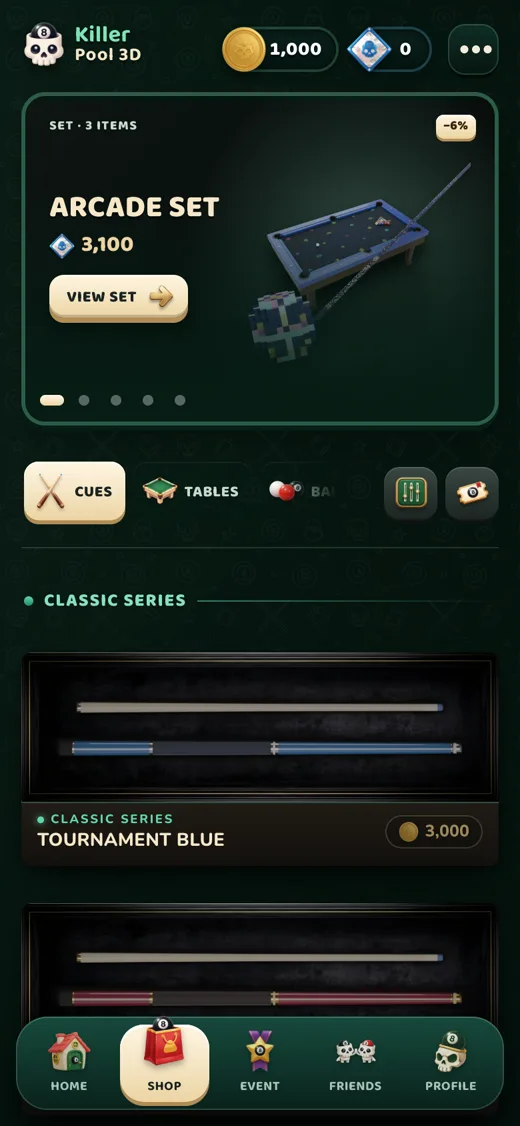
Shop
Shop
Monthly event
Monthly event
  • Shop: cue, table and ball skins and emotes; gem packs. Skins are cosmetic only and never change how you play.
  • Event: a new theme every month with 60 steps. Earn XP to unlock steps; the free track gives coins and a few gems, the ticket track adds exclusive skins. The ticket is bought with gems and the rewards are event-only.
  • Everything you buy is tied to your account and stays when you switch devices.
ℹ️
Prices are shown by the store (App Store, Google Play) or the checkout page for your country. For refunds and payment issues see Support.

Friends, chat and safety

The Friends tab.
The Friends tab.
  • Add friends: send a request by username; you become friends once it is accepted. You can also invite people from a table.
  • Chat: only between mutual friends and only in the lobby, never during a match. You cannot chat with random players.
  • Filter: messages containing profanity, links, emails, phone numbers or @handles are not sent. Messages are deleted after 30 days.
  • Report / Block: report a player or message from the player card or the chat menu. A blocked player can’t send you requests, invites or messages and is not notified. Unblock under “Blocked” in the friends panel.
⚠️
Never share personal details (phone, address, passwords) with anyone. If something feels wrong, report it or write to contact@killerpool3d.com.

Settings and sound

Menu: settings and sign out.

The ⋯ Menu button at the top opens Settings and Sign out. In Settings you will find:

  • Effects, music and master volume
  • Time warning (last 5 seconds of your turn)
  • Event decorations and graphics quality
  • Language: Türkçe, English, Deutsch, Français
  • Replay the tutorial
  1. Settings
  2. Sign out

Managing your account

  • Reset password: “Forgot password” on the sign-in screen; a link goes to your verified email.
  • Username: can be changed from Profile after a waiting period. Inappropriate names are rejected.
  • Guest to permanent account: tap Save on the home screen; your coins and skins are kept.
  • Delete your account: see Delete account for a step-by-step guide with screenshots.

Troubleshooting

I can’t sign in

Check your username/email and password. If your email is not verified, tap the link in your inbox (and spam folder); trying to sign in sends a fresh link.

Google sign-in doesn’t work

Make sure the right Google account is selected on your device. If it keeps failing, sign in with email or send us a screenshot of the error message.

My gems didn’t arrive

Wait a few minutes and restart the app. If they are still missing, email contact@killerpool3d.com with the order time and your username and we will check the purchase record.

The game is slow or choppy

Lower the graphics quality in Settings, close background apps and use Wi-Fi or a good mobile connection; the game runs in sync online.

I lost connection. Was I kicked?

No. Your seat stays until your turn. Come back quickly and tap “Continue game”.

Supported devices

iPhone/iPad (current iOS), Android 7.0 or later, and modern browsers (Chrome, Safari, Edge, Firefox). 3D needs WebGL.

Couldn’t find what you need? Reach us on the Support page.